
Our Life: Now & Forever Expression Elements Explained
What is confirmed about Expression Elements and MC expressions in Our Life: Now & Forever, how dress-up customization works, and sprite fixes.
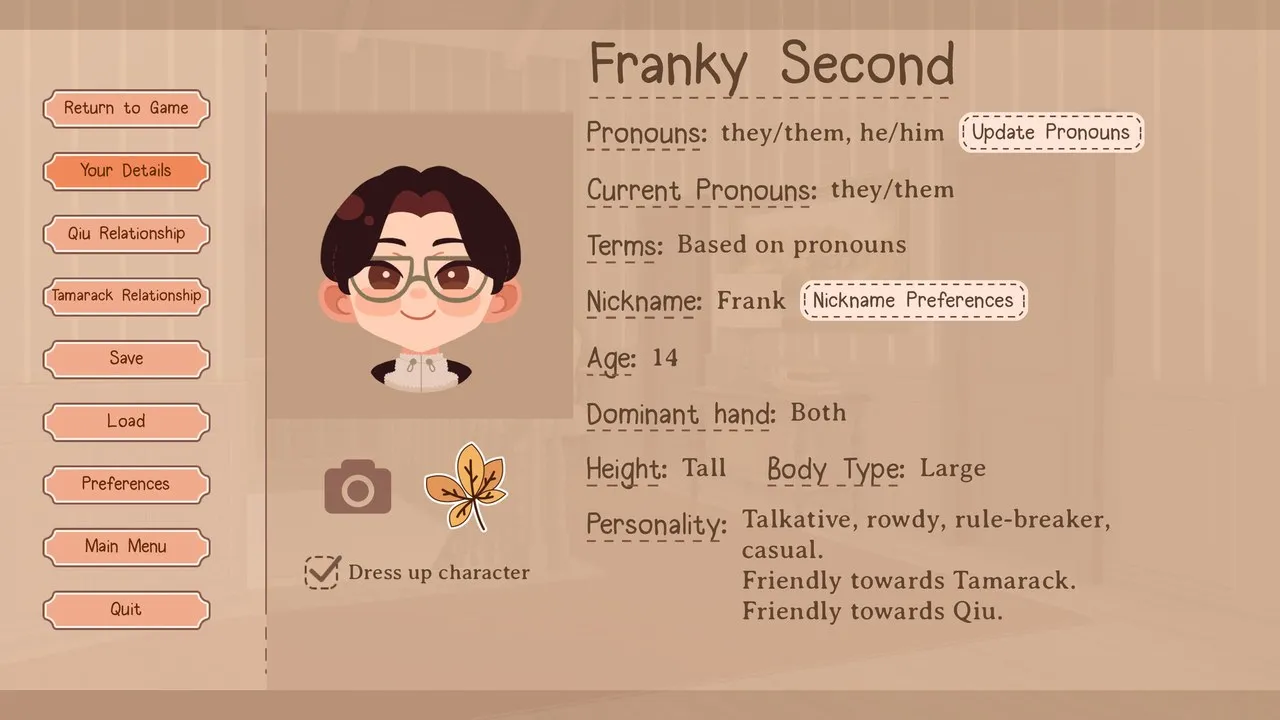
If you spot the Expression Elements setting while building your protagonist in Our Life: Now & Forever and want to know exactly what it changes on sprites and dialogue scenes, public documentation does not give a line-by-line toggle breakdown yet. As of November 28, 2026, developer GB Patch Games has not published an official guide on its Steam store page or itch.io listing detailing how individual Expression Elements toggles alter MC facial expressions or dialogue overlays.
What is confirmed in the Early Access release (Version 0.1.7.2, covering Step 1 and Step 2 as of November 27, 2026) is how the dress-up doll creator, MC profile preview, step-based updates, and sprite rendering settings work together across your time in Golden Grove.
What Is Confirmed About Expression Elements and MC Expressions
Official store descriptions and developer logs confirm that Our Life: Now & Forever features a dress-up doll character creator with skin tones, hair options, saved custom colors, clothing, and accessories, but they do not document the exact per-option behavior of an Expression Elements submenu. Because GB Patch Games has not released a public reference chart for those individual sprite layers, any claim that a specific toggle enables or disables particular dialogue reactions would be guesswork rather than verified fact.
Players who want to check how their MC expressions and visual tweaks look outside the creation screen can inspect their character card directly inside a save. In itch.io community threads, players confirm that opening Preferences, heading into Details (also referred to as Your Details), and clicking the camera icon opens your protagonist’s display card and portrait box. Checking that preview right after editing your doll is the fastest way to verify visual changes before jumping into a new Moment.
When dialing in your protagonist’s look, appearance settings sit alongside other visual layers in the doll editor. If you are sorting through stacked visual toggles or outfit categories at the same time, see our guides to Special Layers and Cultural Clothes to keep your wardrobe and overlay choices organized.
Confirmed MC Customization and Self-Expression Controls
On the official itch.io page and Steam store listing, GB Patch Games details the core systems that control both how your protagonist looks and how they express themselves in Golden Grove. The table below outlines every confirmed customization and presentation control available in Early Access across Windows, macOS, Linux, and Android.
| Customization Area | Confirmed In-Game Options | When You Can Change It |
|---|---|---|
| Dress-Up Doll Appearance | Skin tone, hair styles, saved color palettes, clothes, accessories, and partial family resemblance for your mom (Opal) | Character creation and between Steps |
| Naming & Identity | First name, last name (no middle name slot), honorifics, nickname, and pronouns (including multiple sets or a custom set) | Character creation and between Steps |
| Personality & Dynamics | Hundreds of dialogue choices, shifting disposition and passions, plus dynamic meters toward Qiu Lin and Tamarack Baumann | Across Moments and Step transitions |
| Profile & Readability | Playthrough stickers, MC bio/details card, font choice (including a dyslexia-friendly font), lettering size, two textbox layouts, and self-voicing | Playthrough setup and Preferences menu |
| Sprite & Display Performance | Animation toggle, transition toggle, max text speed, and Shift + G graphics renderer selection |
Main menu Preferences or keyboard shortcut |
Beyond sprite visuals, most of your protagonist’s day-to-day expression comes through dialogue choices and dynamic meters rather than static creator switches. You can pair your visual build with your preferred name setup—covered in our Voiced Names List—and decide how your character comes across to everyone on the cul-de-sac.
Your dynamic meters broadly define how you behave toward your two main neighbors, Qiu Lin and Tamarack Baumann, and their own dynamics toward you adapt over the years based on who you are and what happens. Because those meters and hundreds of personality responses can stay consistent or shift as you grow, you can tailor very different reactions across both the Qiu Route Guide and the Tamarack Route Guide.

Our Life: Now & Forever Demo Gameplay | First Impressions
How Character Changes Work Between Step 1 and Step 2
Early Access launched on November 27, 2026 with the first two of four planned life stages—Step 1 (childhood) and Step 2 (adolescence)—while Step 3 and Step 4 are scheduled for future updates per the itch.io release page. If you expect your MC’s identity or major visual settings to evolve mid-chapter, GB Patch Games explained an important structural boundary in an itch.io developer reply.
Because Moments within a Step can be played in whatever order you choose, the team cannot branch every individual Moment around mid-Step identity transitions. As a result, major self-growth changes—such as updating your protagonist’s pronouns, redesigning their Step appearance, or shifting their overall presentation—are handled between Steps rather than inside an active Moment.
During the Moments themselves, scenes still give your protagonist opportunities to express their current personality, assert their identity, and carry traits forward that characters remember. Players looking to expand the number of scenes where those customized traits and neighborhood relationships play out can also check our DLC Worth It overview covering the optional Step 1 and Step 2 expansions.
Fixing Glitched MC Sprites and Display Issues
If your MC facial expressions or layered sprite pieces look scrambled instead of matching what you picked in the creator, check your renderer and animation settings before recreating your character:
- Glitched or distorted sprites on PC: In a reply on the official itch.io devlog, GB Patch Games advised pressing
Shift + Gand switching the graphics backend to the ANGLE renderer. Players experiencing scrambled sprites confirmed that changing to ANGLE resolved the display glitch immediately. - Slowdowns or crashes on older Android phones: In Early Access support replies on itch.io, GB Patch Games noted that older Android devices can struggle with the game’s asset load. Opening Preferences from the main menu, turning off all animation, disabling transitions, and setting text speed to max helps stabilize playback during sprite-heavy scenes.
If you are playing on Android and notice customization or profile input fields behaving differently than on desktop, check that you installed the latest Early Access package (Version 0.1.7.2 as of November 27, 2026) after uninstalling any older demo build, as GB Patch Games flagged leftover installations as a common source of package errors.
FAQ
How do I preview my MC card and sprite after leaving character creation?
Open the Preferences menu, navigate to Details (or Your Details), and select the picture/camera icon. That view brings up your protagonist’s text box and portrait card so you can inspect your current visual settings without starting a new save.
Can I change my protagonist’s appearance or pronouns in the middle of a Step?
Major identity and appearance updates take place between Steps rather than mid-Step. GB Patch Games confirmed on itch.io that because Moments can be played in any order, restructuring every Moment for mid-Step transitions was outside the team’s scope, though individual scenes still let your MC assert and express their current identity.
Why do character sprites look glitched or distorted on PC?
A graphics renderer mismatch can scramble layered character sprites on some PC setups. GB Patch Games recommends pressing Shift + G in-game and switching to the ANGLE renderer, which players reported fixes the visual corruption right away.
Related Articles
customization
Our Life: Now & Forever Character Creator Guide
Customize your MC's name, pronouns, dress-up doll, and mom's look in Our Life: Now & Forever, plus Step 1 to Step 2 changes and roadmap updates.
customization
Our Life: Now & Forever Room Customization Guide
Bedroom decor and keepsake unlocks in Our Life: Now & Forever are not officially documented as of 2026-11-28. See confirmed customization systems.
customization
Our Life: Now & Forever Personality Traits Guide
How personality traits, Expression Elements, and dialogue choices shape character reactions with Qiu Lin and Tamarack in Our Life: Now & Forever.
Was this helpful?
Thanks for the feedback!